Online or onsite, instructor-led live Authorized Microsoft 365 training courses demonstrate through interactive hands-on practice the fundamentals and advanced concepts of Authorized Microsoft 365.
Authorized Microsoft 365 training is available as "online live training" or "onsite live training". Online live training (aka "remote live training") is carried out by way of an interactive, remote desktop. Trojmiasto onsite live Authorized Microsoft 365 trainings can be carried out locally on customer premises or in NobleProg corporate training centers.
NobleProg -- Your Local Training Provider
Gdynia
Hotel Nadmorski, Ejsmonda 2, Gdynia, Poland, 81-409
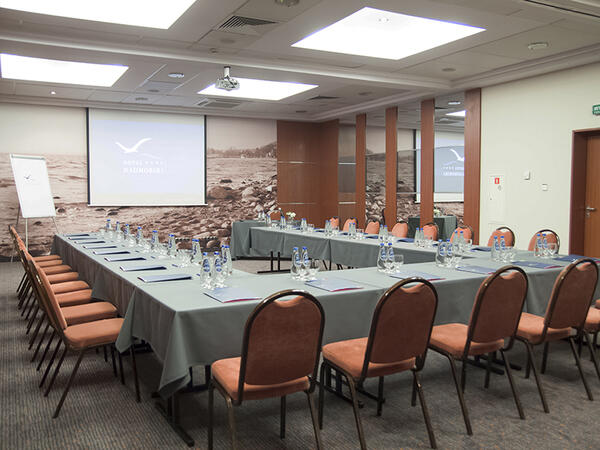
The training room is located just 3 kilometers from the PKP/PKS Station in Gdynia, making it easily accessible for participants traveling by train or bus. Additionally, it is only 400 meters away from the bus stop, facilitating access even for those using public transportation. It is equipped with necessary training tools such as a projector, screen, and flipchart, providing comfortable conditions for both participants and the trainer.
Gdańsk
Hotel Fahrenheit, Grodzka 19, Gdańsk, Poland, 80-841
The training room is located in the very heart of the picturesque Gdansk Old Town, making the surroundings not only inspiring but also exceptionally attractive for participants. Within close proximity, you can find the railway and bus stations, facilitating arrival for those traveling by both train and bus. Additionally, the airport and port are also within reach, making this location convenient for individuals coming from distant places, both domestically and internationally.
This is a three-day Instructor Led Training (ILT) course that targets the needs of information technology (IT) professionals who take part in administering, configuring, troubleshooting, and operating Office 365 services, including its identities, dependencies, requirements, and supporting technologies. This course focuses on skills required to administer and troubleshoot Office 365 tenant and key services of Office 365, such as Exchange Online, SharePoint Online and Teams. It also covers security and compliance features of Office 365.
Audience Profile
This course is intended for IT professionals and system administrators who want to learn about administration and troubleshooting techniques in Office 365. These professionals should have at least three years of experience working in their respective fields: ideally in the areas of system administration, network administration, and messaging.
At Course Completion
After completing this course, students will be able to:
Describe Office 365 services.
Administer Office 365 by using the Microsoft 365 admin center, Office 365 services admin centers, an
Administer and troubleshoot directory synchronization and directory objects.
Administer and troubleshoot Exchange Online.
Administer and troubleshoot Teams.
Administer and troubleshoot SharePoint Online.
Plan and deploy Microsoft 365 Apps for enterprise.
Administer and troubleshoot compliance and security in Office 365.
This is a 5-day instructor-led training (ILT) course that targets the needs of IT professionals who take part in evaluating, planning, deploying, and operating Microsoft Office 365 services, including its identities, dependencies, requirements, and supporting technologies. This course focuses on skills required to set up an Office 365 tenant, including federation with existing user identities, and skills required to sustain an Office 365 tenant and its users
This course is intended for IT professionals who are responsible for planning, configuring, and managing an Office 365 environment. Students who attend this course are expected to have a fairly broad understanding of several on-premises technologies such as Domain Name System (DNS) and Active Directory Domain Services (AD DS). In addition, they should have a general understanding of Microsoft Exchange Server, Microsoft Lync Server or Skype for Business Server, and Microsoft SharePoint Server.
After completing this course, students will be able to:
Plan an Office 365 deployment, configure the Office 365 tenant, and plan a pilot deployment.
Manage Office 365 users, groups, and licenses, and configure delegated administration.
Plan and configure client connectivity to Office 365.
Plan and configure directory synchronization between Microsoft Azure AD and on-premises AD DS.
Plan and implement the Office 365 ProPlus deployment.
Plan and manage Microsoft Exchange Online recipients and permissions.
Plan and configure Exchange Online services.
Plan and configure Microsoft Teams
Plan and configure Microsoft SharePoint Online.
Plan and configure an Office 365 collaboration solutions.
Plan and configure the integration between Office 365 and Microsoft Azure Information Protection.
Monitor and review Office 365 services, and troubleshoot Office 365 issues.
Plan and implement identity federation between on-premises AD DS and Azure AD.
This course provides foundational knowledge on the considerations and benefits of adopting cloud services and the Software as a Service (SaaS) cloud model, with a specific focus on Microsoft 365 cloud service offerings. You will begin by learning about cloud fundamentals, including an overview of cloud computing and specifically Microsoft cloud services. You will be introduced to Microsoft Azure, and you will examine the differences between Microsoft 365 and Office 365. You will then perform an in-depth review of Microsoft 365, including a comparison of Microsoft on-premises services versus Microsoft 365 cloud services, a review of enterprise mobility in Microsoft 365, and an analysis of how Microsoft 365 services provide collaboration. The course then analyzes how security, compliance, privacy, and trust are handled in Microsoft 365, and it concludes with a review of Microsoft 365 subscriptions, licenses, billing, and support.
Audience Profile
This course is designed for Business Decision Makers and IT Professionals who aspire to deploy cloud services in their organization, or who are simply looking to acquire foundational knowledge on cloud fundamentals. This includes the considerations and benefits of adopting cloud services in general and the Software as a Service (SaaS) cloud model specifically, with a general focus on Microsoft 365 cloud service offerings.
At Course Completion
After completing this course, students will be able to:
Differentiate between the various cloud service models.
Identify the key differences between Microsoft 365 subscriptions.
Plan for migration to Microsoft 365 services.
Identify key differences between Microsoft on-premises services and Microsoft 365 cloud services.
Identify how Microsoft 365 services support teamwork.
Describe identities, including cloud, on-premises, and hybrid identity.
Describe cloud device management and protection, including the use of Intune.
Describe data protection, including the use of Azure Information Protection.
Describe compliance in general and the compliance features in Microsoft 365.
Describe Microsoft 365 subscriptions, licenses, billing, and support
Read more...
Last Updated:
Testimonials (1)
This training can be repeated at a different time.
Adrian - Alfa Laval
Course - Office 365 Administration and Troubleshooting (10997DC)
Online Authorized Microsoft 365 training in Trojmiasto, Authorized Microsoft 365 training courses in Trojmiasto, Weekend Authorized Microsoft 365 courses in Trojmiasto, Evening Authorized Microsoft 365 training in Trojmiasto, Authorized Microsoft 365 instructor-led in Trojmiasto, Authorized Microsoft 365 on-site in Trojmiasto, Evening Authorized Microsoft 365 courses in Trojmiasto, Authorized Microsoft 365 coaching in Trojmiasto, Online Authorized Microsoft 365 training in Trojmiasto, Authorized Microsoft 365 instructor-led in Trojmiasto, Authorized Microsoft 365 instructor in Trojmiasto, Weekend Authorized Microsoft 365 training in Trojmiasto, Authorized Microsoft 365 trainer in Trojmiasto, Authorized Microsoft 365 private courses in Trojmiasto, Authorized Microsoft 365 boot camp in Trojmiasto, Authorized Microsoft 365 one on one training in Trojmiasto, Authorized Microsoft 365 classes in Trojmiasto